Version 2.1.0🔗
This version of the CLOD document definition has these non-breaking changes from v2.0.0:
- NEW - 3.B.1: Clarified that ID uniqueness is based on exact value, not absolute value.
- NEW - 3.C.4: Defined that a Parent Element referencing a non-existent ID is a validation failure.
- NEW - 3.C.5: Defined that circular Parent Element references are a validation failure.
- NEW - 3.F: Clarified intended use of the Repetition Separator vs. Integer-named segments.
- NEW - 5.B.5: Clarified that multiple siblings may share the same Name Element.
- NEW - 5.B.6: Clarified intended use of Integer-named segments and consumption order.
- NEW - 5.G: Clarified that all spec rules apply to commented segments and that commenting a parent comments all its children.
1. Railroad Diagram🔗
2. Segments🔗
The CLOD document is broken into Segments by the Segment Terminator as defined by the Base Definition.
2.A. Segment Types🔗
There are two additional types of Segments defined here besides the Base Control Segment: Control Segments and Data Segments.
3. Elements🔗
Each Segment is broken into Elements by the Element Separator as defined by the Base Definition.
3.A. Element Count🔗
There will be 4 and only 4 Elements in each of these additional Segments.
3.B. Identification Element🔗
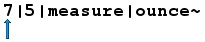
The first Element will be the Identification Element.
3.B.1. Uniqueness🔗
The Identification Element will be unique for every Segment. Uniqueness is based on the exact value of the Identification Element — for example, -5 and 5 are considered distinct and may both exist in the same CLOD document.
3.B.2. Non-Zero ID🔗
The Identification Element cannot be DIGIT ZERO (30hex), as that Identification is reserved to represent the CLOD document itself.
3.B.3. Exclusions🔗
The Identification Element must not contain any characters that are defined by Base.[Control Characters], the Element Separator or the Segment Terminator. It must not start with a single HYPHEN-MINUS (2Dhex), unless it is a Base.[Data Segment].
3.B.4. Requirement🔗
The Identification Element is mandatory and can not be empty.
3.C. Parent Element🔗
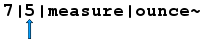
The second Element will be the Parent Element.
3.C.1. Definition🔗
The Parent Element for Segments will be the Identification Element value of that Segment's parent. Any Segments that only have the CLOD document as their parent will have a Parent Element equal to DIGIT ZERO (30hex).
3.C.2. Exclusions🔗
The Parent Element must not contain any characters that are defined by Base.[Control Characters], the Element Separator or the Segment Terminator.
3.C.3. Requirement🔗
The Parent Element is mandatory and can not be empty.
3.C.4. Valid Reference🔗
The Parent Element must reference the Identification Element of another Segment that exists in the CLOD document, or be DIGIT ZERO (30hex) to represent the CLOD document itself. A Parent Element that references a non-existent Identification Element will cause the CLOD document to be considered invalid.
3.C.5. Circular References🔗
A Segment's Parent Element must not create a circular reference. A circular reference occurs when a chain of Parent Elements eventually references back to the originating Segment's own Identification Element. A CLOD document containing a circular reference will be considered invalid.
3.D. Name Element🔗
The third Element will be the Name Element.

3.D.1. Exclusions🔗
The Name Element must not contain any characters that are defined by Base.[Control Characters], the Element Separator or the Segment Terminator.
3.D.2. Requirement🔗
The Name Element is mandatory, but unless it is further defined in this Type definition, it can be empty.
3.E. Content Element🔗
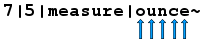
The fourth Element will be the Content Element.
3.E.1. Data Type🔗
The Content Element is to be considered a string data type for the immediate processing of the CLOD document. Any further Data Type definitions are defined in a CLOD Schema document.
3.E.2. Exclusions🔗
The Content Element must not contain any characters that are defined by Base.[Control Characters], the Element Separator or the Segment Terminator.
3.E.3. Requirement🔗
The Content Element is mandatory, but unless it is further defined in this Type definition, it can be empty.
3.F. Repetition Separator🔗
The Repetition Separator is used to separate a Content Element into unindexed array members of the Parent Element's Data Type as defined by a CLOD Schema document. The Repetition Separator is intended for simple, flat lists of scalar values. Because the values share a single segment, they cannot have child segments and are unindexed. For array members that require indexing or that may themselves be parents of child segments, use Integer-named Dataset Data Segments as defined in 5.B.6.
3.F.1. Allowed Values🔗
The Repetition Separator will be CIRCUMFLEX ACCENT (5Ehex).
3.F.2. Example🔗
57|45|colors|red^green^blue^orange~
4. Control Segments🔗
Control Segments are defined as segments whose Identification Element is composed of characters that are defined by Base.[Letters]. Their purpose is to provide information about the CLOD document.
4.A. Name Element Requirement🔗
The Name Element can not be empty.
4.B. Content Element Requirement🔗
The Content Element can not be empty.
4.C. Instance Control Segment🔗
The Instance Control Segment is immediately after the Base Segment in the CLOD document.
4.C.1. Purpose🔗
To uniquely identify the CLOD document by using a UUID.
4.C.2. Element Values🔗
- Identification = "instance"
- Parent = 0
- Name = "uuid"
- Content = a hyphenated UUID without enclosing braces.
4.C.3. Example🔗
instance|0|uuid|108a1ef6-4d75-11eb-ae93-0242ac130002~
4.C.4. Requirement🔗
The Instance Control Segment is mandatory.
4.C.5. Quantity🔗
There can be only one Instance Control Segment per CLOD document.
4.C.6. CLOD Regeneration🔗
When a CLOD document is regenerated from source data, it must have a new UUID, even if the data it contains has not changed from prior instances of the CLOD document.
4.C.7. CLOD Retransmission🔗
When an existing CLOD document is retransmitted, it does not need a new UUID.
4.C.8. UUID Version🔗
The Version 1, Variant 1 UUID is recommended due to it containing date and time data, but any valid Version and Variant can be used.
4.D. Specification Control Segment🔗
The Specification Control Segment is after the Instance Control Segment and before any Data Segments in the CLOD document.
4.D.1. Purpose🔗
To define the location of where the Specification for the CLOD Version can be found.
4.D.2. Element Values🔗
- Identification = "specification"
- Parent = 0
- Name = "url"
- Content = a URL that contains the specification and any other supporting documentation for the CLOD Version.
4.D.3. Example🔗
specification|0|url|https://clod.omegatower.net/versions/2-1-0/~
4.D.4. Requirement🔗
The Specification Control Segment is recommended, but not mandatory.
4.D.5. Quantity🔗
There can be only one Specification Control Segment per CLOD document.
4.E. End Control Segment🔗
The End Control Segment is the last Segment in the CLOD document.
4.E.1. Purpose🔗
To define the ending of the CLOD document and to contain the total count of Data Segments.
4.E.2. Element Values🔗
- Identification = "end"
- Parent = 0
- Name = "count"
-
Content = The total count of Data Segments in the CLOD document, including any commented Data Segments.
Note
NOTE: The total count of Data Segments in the CLOD document is not guaranteed to be the highest value of Identification Element, as the Identification Element is not required to be sequential or any specific set of integers.
4.E.3. Example🔗
end|0|count|14~
4.E.4. Requirement🔗
The End Control Segment is mandatory.
4.E.5. Quantity🔗
There can be only one End Control Segment per CLOD document.
5. Data Segments🔗
Data Segments are defined as segments whose Identification Element is a positive or negative Integer composed of characters that are defined by Base.[Integers] and HYPHEN-MINUS (2Dhex). Their purpose is to contain the data that is being described by the CLOD document.
5.A. Dataset Schema Segment🔗
A Dataset Schema Segment is defined as any Data Segment whose Parent Element is DIGIT ZERO (30hex) as this represents the CLOD document itself. A Dataset is defined as all Dataset Data Segments that can trace their parentage back to a common Dataset Schema Segment.
5.A.1. Schema Name🔗
The Name Element of any Dataset Schema Segment is the name of the Schema. All Datasets in a CLOD document with whose Dataset Schema Segment's Name Element match must follow the same Schema, whether that Schema is explicitly defined or not. The Name element of the Dataset Schema Segment can not be empty.
5.A.2. Schema URL🔗
The Content Element of any Dataset Schema Segment can only be either empty or a URL that points to the Formal Schema document or Informal Schema documentation for this Dataset and its children. It is highly suggested that all Dataset Schema Segments have matching Schema documentation.
5.A.3. Example🔗
1|0|recipe|https://clod.omegatower.net/schemas/recipe-v1/~
5.A.4. Requirement🔗
Each CLOD document must have at least one Dataset Schema Segment.
5.A.5. Quantity🔗
Each CLOD document can contain multiple Dataset Schema Segments. If there are multiple Dataset Schema Segments in the CLOD document, they do not have to match.
5.A.6. Validity🔗
If a Schema URL is defined, then a CLOD document will be considered invalid by all validity checking and parsing tools if the data in the CLOD document does not conform to all the requirements and specifications of that Schema file.
5.B. Dataset Data Segment🔗
A Dataset Data Segment is defined as any Data Segment whose Parent Element is not DIGIT ZERO (30hex) as this represents the CLOD document itself.
5.B.1. Purpose🔗
The Dataset Data Segments of a CLOD document is where the bulk of the data will reside.
5.B.2. Example🔗
61|60|1|Place all ingredients into medium sized bowl.~
5.B.3. Requirement🔗
Each CLOD document must have at least one Dataset Data Segment.
5.B.4. Quantity🔗
Each CLOD document can contain an unlimited number of Dataset Data Segments.
5.B.5. String Data🔗
If the Name Element contains characters that are not defined by Base.[Integers], then the Data Segment is its own Data Type as defined by a CLOD Schema document. Multiple Dataset Data Segments may share the same Parent Element and the same Name Element. In this case they form an unindexed, unordered collection of that Data Type, and is a simpler alternative to the indexed array described in 5.B.6 for cases where order does not matter.
5.B.6. Integer Data🔗
If the Name Element only contains characters that are defined by Base.[Integers], then the Data Segment is an indexed array member of the Parent Element's Data Type as defined by a CLOD Schema document. Integer-named segments are intended for indexed arrays where each member may itself be the parent of child segments, allowing for complex or nested structures. When consuming the array, members are to be processed in ascending order by their Name Element integer value. For simple, flat lists of scalar values that require no indexing or child segments, the Repetition Separator as defined in 3.F may be more appropriate.
5.B.7. Empty Data🔗
If the Name Element is empty, then the Data Segment is an unindexed array member of the Parent Element's Data Type as defined by a CLOD Schema document.
5.B.8. Validity🔗
If a Schema URL is defined, then a CLOD document will be considered invalid by all validity checking and parsing tools if the data in the CLOD document does not conform to all the requirements and specifications of that Schema file.
5.C. Character References🔗
The data in the Name and Content Elements can be encoded with Numeric Character References or Named Entities.
5.C.1. Segment Terminator Encoding🔗
The Segment Terminator must be converted to a Numeric Character Reference or Named Entity when it is used in the Name or Content Elements.
5.C.2. Element Separator Encoding🔗
The Element Separator must be converted to a Numeric Character Reference or Named Entity when it is used in the Name or Content Elements.
5.C.3. Repetition Separator Encoding🔗
The Repetition Separator must be converted to a Numeric Character Reference or Named Entity when it is used in the Name or Content Elements.
5.D. NULL Values🔗
There is no distinction between an empty Content Element and a NULL Content Element for the immediate processing of the CLOD document. Any further Data Type definitions are defined in the CLOD Schema document for the CLOD Dataset.
5.E. Data Typing🔗
All further data typing, definitions, descriptors, limitations, etc... of the data in the CLOD document are defined in the CLOD Schema document for the CLOD Dataset.
5.F. Order🔗
The Dataset Data Segments do not have to be in any specified order in the CLOD document. It is possible they are ordered by Identification. It is also possible they are ordered by Parent, then Identification. It is further possible that they are in any other order, including random. However, when a Parent Element's children are processed, they will be processed in sequential, numeric ascending order by their ID value.
5.G. Comments🔗
Any Dataset Data Segment whose ID Element is a Negative Integer is considered to be a comment and is to be ignored when processed. It can be used for either the purpose of relaying additional information to a human reader or for the purpose of causing a Dataset Data Segment to be ignored during processing. All other rules of the specification apply to commented segments — they must still be structurally valid. All child segments of a commented segment are to be considered commented themselves, regardless of whether their own ID is positive or negative. This allows an entire branch of the document to be commented out by negating the ID of a single ancestor segment.
5.G.1. Example🔗
-56|38||This is a comment.~
6. Reserved Characters🔗
The following characters are reserved for special use:
- CIRCUMFLEX ACCENT (5Ehex)